Run payroll
without chasing anyone.
Set the rules once. Every month applies them the same way — and shows its working.
People
One record per person, and everything else reads from it.
One record. Payroll, attendance and leave all read the same row, so a transfer is one change, not four.
What it won't do · No drag-and-drop org chart — it comes from the manager field, so it cannot disagree with payroll.
Built in the terms payroll here is actually run in
Three things, and they share one record.
Most companies buy these separately and spend the year reconciling them. Here they are one workspace, so a transfer in March is one change rather than four.
People
One record per person, and everything else reads from it.
The same employee exists three times — in a spreadsheet, in the payroll file, and in whoever knows they transferred in March. When the three disagree, payroll is wrong and nobody can say when it started.
Discover
Time
Attendance, leave and shifts that agree with each other.
Leave is approved in email, attendance comes off a device, and the two only meet when payroll runs and somebody is docked for a day they were granted.
Discover
Money
Payroll you can show your working for.
Payroll is a spreadsheet one person understands. When somebody asks why their tax changed, the answer takes an afternoon and rests on trusting that no formula was dragged one row too far.
Discover
Your month, side by side.
Pick a day. Left: HR in spreadsheets and a chat thread. Right: the same day with the answers already in one place.
Drag through the month
Someone starts today
A photocopied ID goes in a drawer. The offer letter lives in a chat thread. IT learns at 10:40 that a laptop was needed at 9:00.
Marking the candidate hired opens an onboarding checklist. IT, finance and the manager each get their own task with their own due date.
This is the screen, not a drawing of it.
Real captures from a running workspace. The Nepali month names, the lakh grouping and the statutory columns are not a localisation layer — they are what the engine computes in.
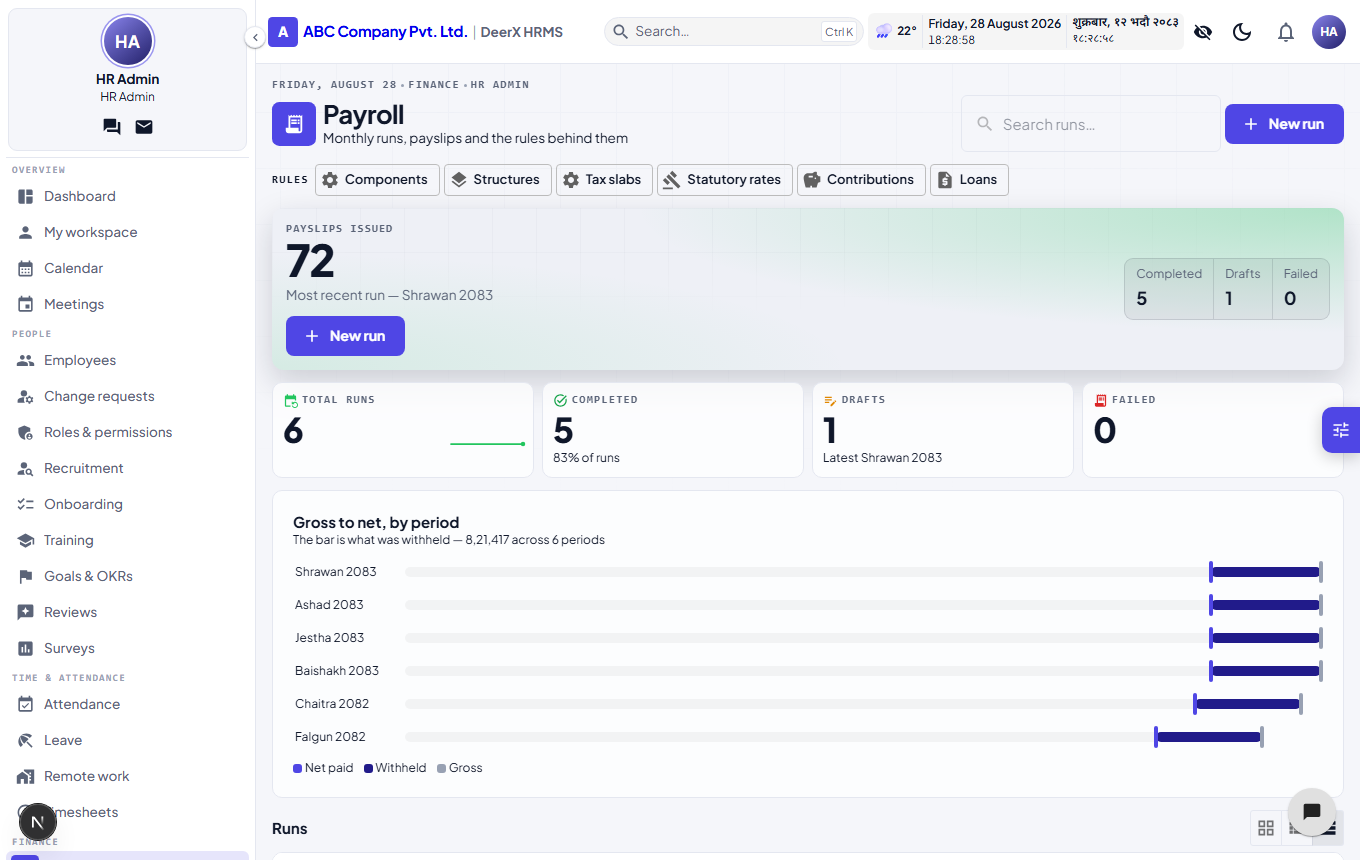
Periods are Shrawan and Ashad, not July and August. Figures group as 8,21,417 — lakhs, not thousands. Nothing here was translated after the fact.
Six domains, one set of records underneath.
Each one says what it will not do, as well as what it will.
People
One record per person, and everything else reads from it.
Employee records · Org chart · Lifecycle events · Documents · E-signature
Time
Attendance, leave and shifts that agree with each other.
Attendance · Device ingest · Shifts & rosters · Leave · Holidays & events
Money
Payroll you can show your working for.
Salary structures · Formula engine · Tax slabs · Payroll runs · Payslips
Growth
Hiring, goals and reviews on the same records.
Goals & OKRs · Review cycles · Training · Surveys · Recruitment
Comms
The messages that belong to the work, beside the work.
Chat · Mail · Helpdesk · Announcements · Notifications
Business
Clients, deals and invoices, for the companies that also sell.
CRM · Invoicing · Reports · Import & export · Operator console
0 modules, one workspace, one set of identities.
Not a roadmap — built and running. The point isn't the count: the CRM deal, the person staffed on it and the invoice it produced are one join apart, not four exports apart.
Employee records
PEOPLEProfiles, departments, designations, prior experience, per-field change log.
Native mobile apps, vendor-specific biometric drivers, a desktop activity tracker, an asset register, a Bikram Sambat calendar layer, leave accrual schedules and encashment, and shifts that cross midnight. The registered-device ingest endpoint and the data model behind biometric attendance exist; the device-vendor drivers do not.
Late is a line somebody drew. Move it.
One office, one month, every arrival plotted against the start of the shift. The grace window decides who was late; a second rule decides whether being late costs anything. Both are yours, and the second one ships switched off.
15 min
91
56 of 100
none
Drag the grace window
The grace window belongs to the shift, so a factory shift and an office one can disagree about it. The deduction is a company-wide switch that stays off until somebody turns it on, and it charges whole days rounded down — never a fraction of a day nobody agreed to. The arrivals above are a generated sample, not a customer’s month; the two rules acting on them are the ones the engine runs.
Try changing a salary rule.
Live, and it calculates the way your payroll would. Move anything — every figure shows how it was reached.
Drag to change the salary
Basic
Allowance
Provident fund
Social security
Income tax
annualised ÷ 12
Example rows. In a workspace these are records with a fiscal year on them.
Why this matters
When a budget changes the rates mid-year, most systems make that a support ticket and a release you wait for. Here it is four numbers, edited by the person who read the circular, dated to the fiscal year it applies to — and the previous year's slabs stay exactly where they were, so last year's payslips still reproduce.
The bracket you are in is not the rate you pay.
Move the salary. The staircase is the band your next rupee falls into; the curve is what you actually pay across the whole year. They are never the same number, and the gap between them is the thing people argue about at appraisal time.
Rs 9,00,000
7.2%
20%
Drag the salary
These are the bands the payroll engine applies, and they are records in your workspace — one row per band, per fiscal year, editable by you. Every plan ships them unverified on purpose, with a screen that shows which rows nobody has checked against the current Finance Act yet. Rules you cannot inspect are rules you are trusting.
Run one month in parallel and check every figure against your spreadsheet.
That is the honest way to buy payroll software, and it is the step we would want if we were you. Nothing is finalised until you say so.
0
capabilities
across six domains, one workspace0
permissions
short enough that somebody audits it0+
backend tests
run before anything reaches you0
database schema per company
not a tenant column somebody can forgetClaims are cheap. Here is how each one is actually built.
If a claim on this page has no mechanism behind it, it should not be on this page.
Your data isn't filtered out of everyone else's. It was never in there.
Most multi-tenant systems put every company in the same tables and add acompany_idto every query. It works until one query forgets. Here each workspace is its own PostgreSQL schema, resolved before a query runs. Try both.
SELECT * FROM payroll_payslip
  WHERE company_id = 42;
One PostgreSQL schema per workspace, created and migrated at provisioning.
Tokens held in HttpOnly cookies and proxied server-side — never readable by page scripts.
Employee changes, attendance edits, approvals and platform actions each write their own log.
Your schema dumps cleanly. Portability is a property of the design, not a favour.
Where you are decides what you should turn on.
A five-person team switching on performance reviews is how software gets abandoned in month two. Pick yourself below, including what to leave alone.
HR is a founder's side task. Everything works until the first person asks how much leave they have left.
Employees, leave, attendance, self-service.
Payroll once headcount makes the sheet risky; recruitment when hiring becomes constant.
Five steps, and one of them is us telling you not to trust us yet.
Migrations fail when a vendor asks for faith at the switchover. Step four exists because the only thing that earns trust in payroll is a month you checked yourself.
Claim a subdomain
Minutes, unattendedYour workspace is provisioned with its own database schema and its own migrations. Nothing about it is a row in a table shared with another company.
Bring your people in
One CSVImport the spreadsheet you already maintain. Departments, designations and reporting lines come across; what doesn't map is reported back line by line rather than silently dropped.
Describe your rules
The real workSalary components, tax slabs, leave types, approval chains, shifts, holidays. This is the part most systems hide behind a consultant — here it is a form you fill in and can change later.
Run a month in parallel
Our favourite stepProcess a payroll period alongside your existing sheet and compare, line by line, before anybody depends on it. Trust the output because you checked it, not because we asked you to.
Operate
Month two onwardPayslips, reports, approvals and the audit trail behind all three. The spreadsheet becomes a backup you stop opening.
Pick the one that hurts most.
Nothing has to go live at once. Most companies start with the month they most dread and switch the rest on afterwards.
People
One record per person, and everything else reads from it.
The same employee exists three times — in a spreadsheet, in the payroll file, and in whoever knows they transferred in March. When the three disagree, payroll is wrong and nobody can say when it started.
Discover
Time
Attendance, leave and shifts that agree with each other.
Leave is approved in email, attendance comes off a device, and the two only meet when payroll runs and somebody is docked for a day they were granted.
Discover
Money
Payroll you can show your working for.
Payroll is a spreadsheet one person understands. When somebody asks why their tax changed, the answer takes an afternoon and rests on trusting that no formula was dragged one row too far.
Discover
Ask the awkward ones.
Including the ones with a "no" in the answer. A vendor that only publishes the flattering questions is telling you which ones to ask on the call.
A person reads this.
Not a chatbot and not a drip sequence. Tell us what you're trying to fix and you'll get a straight answer — including "this isn't the right tool for you yet", when that's the honest one.